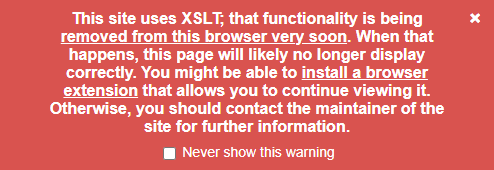
Have seen the following alert message in your Chrome web browser when reviewing your XML sitemap recently?
“This site uses XSLT; that functionality is being removed from this browser very soon. When that happens, this page will likely no longer display correctly. You might be able to install a browser extension that allows you to continue viewing it. Otherwise, you should contact the maintainer of the site for further information.”
End of XSLT Support
Start in November 17th, 2026, the Chrome browser will no longer support XSLT largely due to a general lack of support and maintenance for the libraries required and increasing security concerns.
Google reports XSLT is used in only 0.02% page load events, but the underlying library (libxlst) could cause a security concern for all Chrome users.
Other browsers like Firefox are likewise planning to sunset XSLT support.
What is XSLT?
XSLT is a language that takes data stored in a structured format called XML and automatically converts it into something else, such as a web page, a different data format, or a printable document. A developer writes a set of rules describing how each piece of the original data should look in the result, and the program applies those rules yielding a more human-readable version. XSLT is commonly used to display data as web pages, and produce things like news feeds and sitemaps.
SEO Sitemaps
Common WordPress SEO plugins like Rank Math and Yoast SEO, use XSLT to generate a highly legible XML sitemap for human use.
The XML version might appear like this:
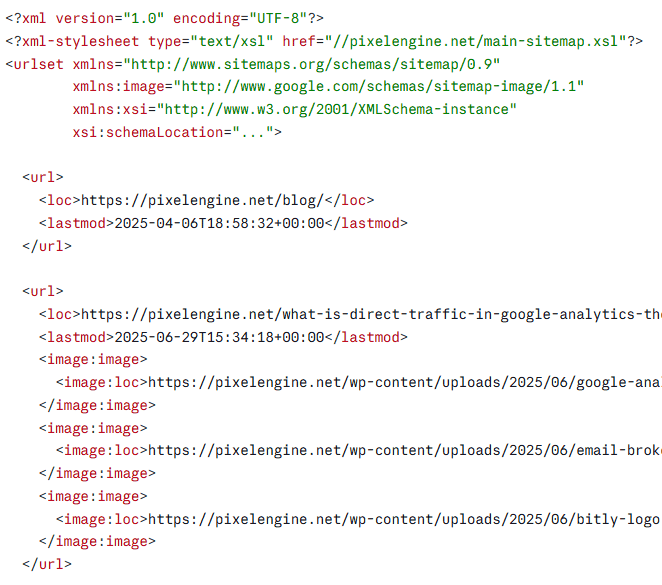
Which is understandably hard to read through, especially when sitemaps may go into the hundreds if not thousands of pages.
When the same data is styled using XSLT, it appears similar to the following:
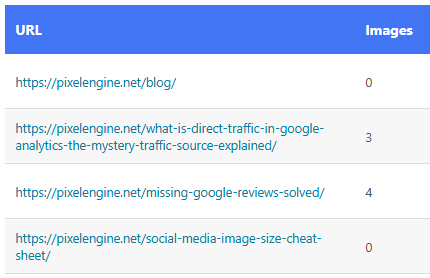
Much better!
Feed Readers
While a raw XML or Atom feed that was styled with XSLT may look unstyled when this change hits, it should not interfere with the function of your feed reader.
Should You Be Concerned?
Common applications using XSLT will need to transition to other means of styling their display of data.
Yoast SEO has mentioned a change to using CSS will be forthcoming. It is likely that other similar WordPress plugins such as Rank Math and All-in-One SEO will follow suit.
For these applications the XML data will be avaialble for Googlebot and other crawlers to ingest and parse. Web site managers should not overly worry, but keep note of changelogs for new versions of the plugins they use.
Any site using Google Search Console or Bing Webmaster Tools can check the sitemap section of those tools and ensure there are no issues.
What to Do Now
1) Update your SEO plugin when a CSS-based version ships. Be sure to clear any caches or CDN in use.
2) Double check your sitemap report in Google Search Console and Bing Webmaster Tools and confirm your sitemap URL still loads and validates.
3) Let your team and clients know so you can avoid those “sitemap is broken” inquiries.
4) If you need a human readable version of your sitemap before a patch is available for your SEO plugin, try using Screaming Frog or point your favorite AI/LLM at your sitemap and ask for a human-readable version as an Excel document or table.